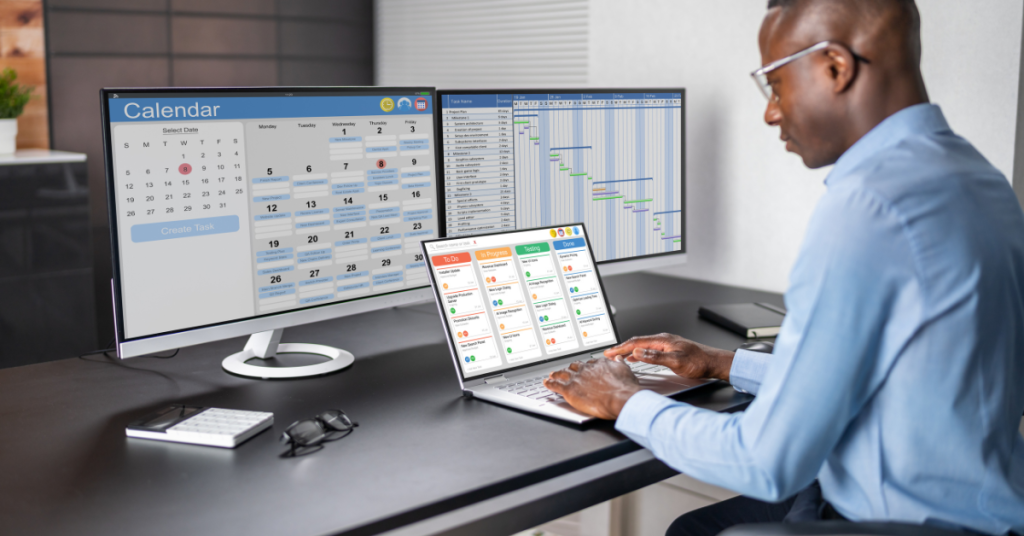

In the ever-evolving landscape of digital tools, finding the perfect productivity app can be a daunting task. As we approach 2024, the market is flooded with options promising to streamline our workflows and boost our efficiency. In this article, I’ll share my personal journey to discover the ultimate productivity app for daily use, exploring the top contenders and essential features that can transform the way we work and live.
What are the best productivity apps for 2024?
As we look ahead to 2024, the productivity app market continues to innovate and expand. From tried-and-true favorites to cutting-edge newcomers, there’s no shortage of options to help us stay organized and efficient. Let’s dive into some of the top categories and standout apps that are shaping the future of productivity.
Top-rated to-do list apps
When it comes to managing tasks, a reliable to-do list app is essential. Todoist remains a frontrunner in this category, offering a clean interface and powerful features for organizing tasks and projects. Its natural language input and cross-platform syncing make it a favorite among users who need to manage tasks across multiple devices. Another strong contender is Microsoft To Do, which has gained popularity since its acquisition of Wunderlist. It offers a seamless integration with the Microsoft ecosystem and provides a user-friendly experience for both personal and professional task management.
Most efficient calendar apps
For many, a robust calendar app is the cornerstone of productivity. Google Calendar continues to dominate this space, offering seamless integration with Google Workspace and a host of features for managing appointments and events. However, apps like Fantastical are gaining ground, particularly among MacOS users, thanks to their natural language processing and beautiful interface. For those looking to optimize their time, calendar apps with time-blocking capabilities, such as Calendar or Sunsama, are becoming increasingly popular, allowing users to allocate specific time slots for tasks and projects.
Innovative project management tools
Project management apps have evolved significantly, offering more than just task lists and deadlines. Asana and Trello continue to be popular choices, with their flexible boards and collaborative features. However, newcomers like ClickUp and Notion are gaining traction by offering all-in-one workspaces that combine project management, note-taking, and team collaboration. These tools are particularly appealing for those looking to consolidate their workflow into a single platform.
How do I choose the right productivity app for my needs?
Selecting the perfect productivity app requires a thoughtful approach and careful consideration of your unique needs and work style. Let’s explore some strategies for making an informed decision.
Assessing your personal workflow
Before diving into the sea of productivity apps, it’s crucial to take a step back and analyze your current workflow. Consider the types of tasks you handle most frequently, the projects you manage, and the challenges you face in staying organized. Do you primarily need a robust to-do list app, or are you looking for a comprehensive project management tool? Understanding your specific needs will help narrow down the options and guide you towards apps that align with your work style.
Comparing features across different apps
Once you’ve identified your core needs, it’s time to compare the features offered by different productivity apps. Look for apps that excel in the areas most important to you, whether that’s task management, time tracking, or collaboration tools. Pay attention to unique features that could enhance your productivity, such as natural language processing for quick task entry or AI-powered suggestions for task prioritization. Don’t forget to consider the user interface and overall user experience, as these factors can significantly impact your daily interaction with the app.
Considering cross-platform compatibility
In today’s interconnected world, the ability to access your productivity tools across various devices is crucial. Ensure that the app you choose offers seamless syncing between your smartphone, tablet, and computer. If you use both Windows and MacOS devices, look for apps that provide a consistent experience across both platforms. Additionally, consider how well the app integrates with other tools in your workflow, such as email clients or cloud storage services. The goal is to create a frictionless ecosystem that supports your productivity rather than hindering it.
Can a single app handle all my productivity needs?
As the productivity app market matures, the question of whether a single app can meet all our needs becomes increasingly relevant. Let’s explore the options and weigh the pros and cons of different approaches.
All-in-one productivity suites
The concept of an all-in-one productivity suite is appealing, offering a centralized hub for managing tasks, projects, notes, and more. Apps like Notion and ClickUp have gained popularity by providing comprehensive workspaces that aim to replace multiple specialized tools. These platforms often include features for task management, project planning, note-taking, and even team collaboration. The advantage of this approach is the seamless integration between different productivity functions and the elimination of context switching between apps. However, all-in-one solutions may not always offer the same depth of features as specialized tools in each category.
Integrating multiple specialized apps
On the other hand, many users prefer to use a combination of best-in-class apps for different aspects of their productivity workflow. This approach allows for greater customization and the ability to choose the most powerful tools for each specific need. For example, you might use Todoist for task management, Evernote for note-taking, and Asana for project management. The challenge with this approach is ensuring smooth integration between these different tools, which is where automation platforms like Zapier can play a crucial role in creating a cohesive workflow.
Pros and cons of using a single app vs. multiple tools
The decision between using a single all-in-one app or multiple specialized tools depends on your specific needs and preferences. A single app can offer simplicity and reduce the cognitive load of managing multiple platforms. It can also provide a more consistent user experience and eliminate the need for complex integrations. However, specialized tools often offer more advanced features in their respective domains, which can be crucial for power users or those with specific requirements. Additionally, using multiple apps allows for greater flexibility in customizing your workflow and the ability to swap out individual tools as needed without disrupting your entire system.
What are the key features to look for in a productivity app?
When evaluating productivity apps, certain features stand out as essential for maximizing efficiency and organization. Let’s explore some of the key functionalities to consider.
Task management and to-do list functionality
At the core of any productivity app is its ability to help you manage tasks effectively. Look for features such as easy task creation, the ability to set due dates and reminders, and options for categorizing and prioritizing tasks. Advanced features like subtasks, recurring tasks, and the ability to attach files or notes to tasks can greatly enhance your task management capabilities. Some apps also offer intelligent task suggestions or AI-powered prioritization to help you focus on what’s most important.
Calendar integration and time-blocking capabilities
A strong integration between your task list and calendar is crucial for effective time management. Look for apps that allow you to seamlessly convert tasks into calendar events and vice versa. Time-blocking features, which enable you to allocate specific time slots for tasks or projects, can be particularly helpful in structuring your day and ensuring you dedicate appropriate time to your priorities. Some advanced apps even offer automatic scheduling suggestions based on your task list and available time slots.
Note-taking and idea capture tools
The ability to quickly capture ideas, meeting notes, or project details is essential for many users. Look for note-taking features that support rich text formatting, file attachments, and easy organization through tags or folders. Some productivity apps offer advanced note-taking capabilities like mind mapping or whiteboard tools, which can be valuable for brainstorming and visual thinking. The ability to link notes to tasks or projects can also help create a more cohesive productivity system.
How can I optimize my workflow using productivity apps?
Once you’ve chosen your productivity tools, the next step is to optimize your workflow to make the most of their features. Here are some strategies to enhance your productivity using these apps.
Setting up an effective task management system
Start by establishing a clear system for organizing and prioritizing your tasks. Many users find success with methodologies like Getting Things Done (GTD) or the Eisenhower Matrix. Utilize your app’s features for categorizing tasks, such as projects, contexts, or priority levels. Set up recurring tasks for regular responsibilities and use due dates judiciously to avoid overwhelming yourself. Consider implementing a weekly review process to keep your task list current and aligned with your goals.
Utilizing time-tracking and Pomodoro techniques
Incorporate time-tracking features to gain insights into how you’re spending your time and identify areas for improvement. Many productivity apps offer built-in timers or integrate with specialized time-tracking tools. The Pomodoro Technique, which involves working in focused 25-minute intervals followed by short breaks, can be an effective way to boost productivity. Look for apps that support this technique with built-in timers and the ability to link time blocks to specific tasks or projects.
Automating repetitive tasks with Zapier and other integrations
Leverage automation tools like Zapier to streamline your workflow and reduce manual data entry. For example, you could set up automations to create tasks from email messages, add calendar events based on project deadlines, or sync information between different apps. Many productivity apps offer native integrations with popular tools, so explore these options to create a more seamless workflow. By automating routine tasks, you can free up more time for focused, high-value work.
Which productivity apps work best for both work and personal life?
Finding a productivity app that seamlessly bridges the gap between work and personal life can be a game-changer for many users. Let’s explore some features and apps that excel in this area.
Apps with robust categorization and tagging features
Look for apps that offer flexible categorization systems, allowing you to easily separate work and personal tasks while still maintaining a unified view when needed. Apps like Todoist and Things 3 excel in this area, offering tags, projects, and filters that make it easy to switch between different contexts. The ability to create custom views or smart lists based on tags or other criteria can help you focus on the right tasks at the right time, whether you’re in work mode or managing personal responsibilities.
Tools that offer separate workspaces for different contexts
Some productivity apps, such as Notion and ClickUp, offer the ability to create separate workspaces or areas for different aspects of your life. This feature allows you to maintain distinct environments for work projects, personal goals, and shared family tasks, while still providing a unified interface for managing everything. Look for apps that make it easy to switch between these contexts and offer customizable dashboards for each area of your life.
Apps with strong privacy and data segregation capabilities
When using a single app for both work and personal tasks, privacy and data segregation become crucial considerations. Look for apps that offer robust privacy settings, allowing you to control which information is visible or shareable. Some apps provide options to password-protect certain sections or limit access to sensitive information. Additionally, consider how the app handles data syncing and storage, especially if you’re using a work-provided device for personal tasks or vice versa.
Are there any productivity apps specifically designed for MacOS users?
For MacOS users, there are several productivity apps tailored to leverage the platform’s unique features and design aesthetics. Let’s explore some options that cater specifically to the Apple ecosystem.
Native MacOS productivity tools
Apple offers several built-in productivity tools that integrate seamlessly with MacOS. The Reminders app has evolved into a capable task manager, offering features like smart lists and natural language input. The Notes app provides a simple yet powerful solution for note-taking and idea capture, with features like document scanning and Apple Pencil support on iPadOS. For project management, the Numbers spreadsheet app can be customized to create Kanban boards or Gantt charts. While these native tools may not offer the advanced features of third-party apps, they provide a solid foundation for productivity within the Apple ecosystem.
Cross-platform apps with excellent MacOS integration
Many popular productivity apps offer versions optimized for MacOS, providing a native experience while still allowing cross-platform usage. Apps like Things 3, OmniFocus, and Bear are known for their excellent MacOS integration, offering features like Touch Bar support, seamless iCloud syncing, and design aesthetics that align with Apple’s guidelines. These apps often provide a consistent experience across MacOS, iOS, and iPadOS, making them ideal for users deeply invested in the Apple ecosystem.
MacOS-exclusive productivity apps and their alternatives
Some productivity apps are developed exclusively for MacOS, taking full advantage of the platform’s capabilities. For example, Fantastical offers a powerful calendar experience with natural language input and deep integration with other MacOS features. Alfred serves as a supercharged replacement for Spotlight, offering advanced search capabilities and workflow automation. While these MacOS-exclusive apps can offer unique benefits, it’s important to consider cross-platform alternatives if you need to work across different operating systems. In such cases, look for apps that offer feature parity and smooth data syncing between their MacOS and other platform versions.
In conclusion, the journey to find the best productivity app for daily use is a personal one, influenced by individual needs, work styles, and technological preferences. As we look ahead to 2024, the productivity app landscape continues to evolve, offering innovative solutions to help us manage our tasks, time, and projects more effectively. By carefully considering your requirements, exploring the features of various apps, and optimizing your workflow, you can create a productivity system that enhances both your professional and personal life. Remember that the ultimate goal is not just to find the perfect app, but to develop habits and systems that truly boost your productivity and help you achieve your goals.